3DS 支付验证(3DS1 和 3DS2)
3-Domain Secure™(3D 验证或 3DS)身份验证允许您在提交 Authorization 或 Pay 交易前对付款人进行身份验证,从而保护在线购买、防范信用卡欺诈。 Mastercard Gateway 同时支持两个 3DS 版本 — 3DS1 和 EMV 3DS。
3DS1 是旧版本,允许付款人通过输入先前在其发卡机构注册的密码,在其发卡机构的访问控制服务器 (ACS) 上进行身份验证。 3DS2 同时还接受输入密码或无障碍流。 身份验证支持的组织包括 Mastercard、Visa、American Express、JCB、Discover 和 Diners Club。
虽然您的支付服务提供商可以通过网关在您的商家配置文件上同时配置 3DS1 和 3DS2,但是您可以通过在身份验证请求中指定您的选择来限制您希望接受的版本。 如果两者均接受,网关将使用 3DS2(如果发卡机构和卡支持),只对于受监管市场才会尝试回退到 3DS1。 如果两者都不可用,身份验证将不会继续。 但是,如果网关建议您继续处理付款,您仍然可以继续。
下图说明的付款身份验证流中,网关因为卡不能使用 3DS2 而退回使用 3DS1 身份验证。 网关还会在其他情况下尝试 3DS1,例如,仅启用 3DS1 时,或当身份验证请求中将身份验证版本限制为只能使用 3DS1 时。
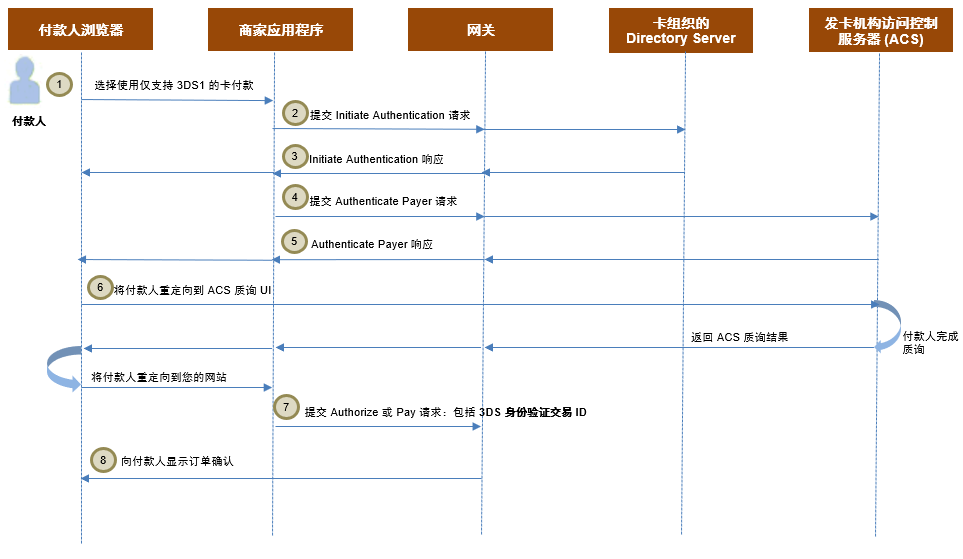
成功的身份验证的身份验证流如下所示:
- 付款人浏览您的购物网站,选择一件或多件产品,进入付款页,选择使用支持 3DS1(不支持 3DS2)的卡付款。
- 发起身份验证: 您要求网关通过卡组织检查卡是否注册了 3DS。
- 如果付款人的 3DS1 身份验证可用,网关将在响应中返回卡注册详细信息。
如果卡同时支持 3DS1 和 3DS2,网关将首先尝试使用 3DS2。 请参见 3DS2 流。
- 对付款人进行身份验证: 您要求网关执行发起的身份验证。
- 网关为您提供质询流身份验证(要求付款人响应发卡机构提供的质询)的详细信息。
- 您将付款人的 Web 浏览器重定向到 ACS,那里会显示身份验证 UI。 发卡机构将身份验证结果返回到网关。 网关将付款人直接重定向到您的网站。
- 在付款操作中使用 3DS 身份验证交易 ID: 您提交付款进行处理。
- 您向付款人显示订单确认页。
以下是 3DS1 集成文档中会引用的一些关键术语。
| 术语 | 说明 |
|---|---|
| 访问控制服务器 (ACS) | 在发卡机构域内运行的组件,验证身份验证是否可用于卡号和设备类型,并对特定交易进行身份验证。 |
| ACS 方法调用 | 适用于 3DS2 身份验证。 一个调用,允许 ACS 收集其他数据来确定付款人的风险分数。 当 3DS2 可用并且发起身份验证后响应中返回了 ACS 调用详细信息时,这些详细信息将被传送到付款人的浏览器,并在隐藏内嵌框架中作为表单发布提交,以便 ACS 可以收集其他数据。 |
| 无障碍流 | 由于 ACS 将付款人视为低风险,因此不需要付款人响应质询的身份验证流。 |
| 质询流 | 由于 ACS 没有足够的付款人信息来将付款人视为低风险,因此付款人被重定向到 ACS 并需要响应质询来证明自己身份的身份验证流。 |
| 付款会话 | 付款会话或简单会话是参考会话的操作的所有请求字段和值的暂时容器。 您可以在操作中使用它来引用请求字段和值,而不是在操作请求中直接提供这些信息。 当网关收到参考会话的操作时,它将会话中的请求字段与请求中直接提供的字段合并,来建立最终请求。 有关详细信息,请参阅付款会话。 |
| 会话身份验证 | 使用付款会话进行身份验证。 此身份验证允许付款人通过付款人的浏览器或付款人移动设备上的应用,通过与网关的客户端交互将其付款详细信息直接提供给网关。 它使用基本的 HTTP 身份验证机制(类似于密码身份验证),在这种机制中,您必须在用户 ID 部分提供 'merchant.<your gateway merchant ID>',在密码部分提供会话 ID。 要使用此身份验证类型,您必须首先将会话请求从您的服务器提交到网关服务器来创建会话(请参见“创建会话”[REST][NVP])。 |
| 商家身份验证 | 一种机制,允许商家对网关收到的 API 请求进行身份验证,例如,密码/证书/会话/身份验证。 |
| 身份验证 API | 一个服务器端 API,包含两个操作 Initiate Authentication 和 Authenticate Payer,必须从您的服务器提交到网关服务器。 它还可以用作使用基于会话的身份验证的客户端 API。 |
| 3DS JavaScript API | 一个客户端 JavaScript API,允许您使用基于会话的身份验证从付款人的浏览器发起 3DS 身份验证。 |
| 身份验证通道 | 指示在付款人的浏览器中、付款人移动设备上的应用内或没有付款人进行交互的系统中进行 3DS 身份验证的位置。 这些信息会影响哪些身份验证类型和流可用,例如,仅在浏览器中并且付款人可与 ACS 交互时支持使用 3DS1。 |
| 身份验证目的 |
|
支持扩展 3DS1 的国家/地区回退到 3DS1
发起身份验证 - 3DS1 回退
Initiate Authentication 操作用于确定给定卡可以使用的 3DS 版本。 如果满足以下任一条件,现有的 3DS 支付验证版本将回退到 3DS1。
- 您在包括 authentication.acceptVersions=3DS1 的请求中指定仅接受 3DS1,或接受 3DS1 和 EMV 3DS 身份验证方法的组合,如 authentication.acceptVersions=3DS1、3DS2,或未提供。
- 您的支付服务提供商在您的商家配置文件中配置了 3DS1 身份验证
- 卡组织支持 3DS1 付款人身份验证
- authentication.channel=PAYER_BROWSER
- authentication.purpose=PAYMENT_TRANSACTION,
- 以下是网关向相关身份验证提供商提交的请求的结果。
- EMV 3DS 对此卡不可用,或
- EMV 3DS 身份验证在发卡机构的访问控制服务器 (ACS) 上不可用,您所在的国家/地区扩展了 3DS1 支持,3DS1 回退优先于 EMV 3DS 方案的替代身份验证。
支持的国家/地区和方案
此表列出了当 EMV 3DS 身份验证在发卡机构的 ACS 上不可用时尝试 3DS1 回退的国家/地区和身份验证计划。
| 身份验证计划 | 商家国家/地区 |
|---|---|
| Mastercard Identity Check | 印度和孟加拉国 |
| Visa Secure | 印度、孟加拉国、斯里兰卡、不丹、马尔代夫、尼泊尔 |
| American Express SafeKey | 印度 |
order.subMerchant.address.country 请求字段中提供商家国家/地区。 请参见整合方支持了解更多详细信息。示例
{
    "authentication": {
        "acceptVersions":"3DS1,3DS2",
        "channel": "PAYER_BROWSER",
        "purpose": "PAYMENT_TRANSACTION"
    },
    "correlationId": "test",
    "order": {
        "currency": "USD"
    },
    "sourceOfFunds": {
        "provided": {
            "card": {
                "number": "<card_number>"
            }
        }
    },
    "apiOperation": "INITIATE_AUTHENTICATION"
}
例如,3DS1 支持扩展的国家/地区的商家,EMV 3DS 身份验证在发卡机构 ACS 不可用。
{
    "authentication": {
        "acceptVersions":"3DS1,3DS2",
        "channel": "PAYER_BROWSER",
        "purpose": "PAYMENT_TRANSACTION"
    },
    "correlationId": "test",
    "order": {
        "currency": "USD"
    },
    "sourceOfFunds": {
        "provided": {
            "card": {
                "number": "<card_number>"
            }
        }
    },
    "apiOperation": "INITIATE_AUTHENTICATION"
}
例如,扩展 3DS1 支持的国家/地区的商家的跨境交易,国际发卡机构 ACS 支持 EMV 3DS;或 3DS1 关闭的国家/地区的商家,本地发卡机构 ACS 支持 EMV 3DS。
{
    "authentication": {
        "3ds2": {
            "directoryServerId": "A999999999",
            "methodSupported": "NOT_SUPPORTED",
            "protocolVersion": "2.1.0",
            "requestorId": "test40Field@S^2sfds2ID",
            "requestorName": "test40Field@S^2sfds2Name"
        },
        "acceptVersions": "3DS1,3DS2",
        "channel": "PAYER_BROWSER",
        "purpose": "PAYMENT_TRANSACTION",
        "redirect": {
            "html": "<script id=\"initiate-authentication-script\"></script>"
        },
        "version": "3DS2"
    },
    "correlationId": "test",
    "merchant": "TEST3DS12AUTH",
    "order": {
        "authenticationStatus": "AUTHENTICATION_AVAILABLE",
        "creationTime": "2022-11-03T08:22:17.087Z",
        "currency": "USD",
        "id": "Test1",
        "lastUpdatedTime": "2022-11-03T08:23:17.905Z",
        "merchantCategoryCode": "1234",
        "status": "AUTHENTICATION_INITIATED",
        "totalAuthorizedAmount": 0,
        "totalCapturedAmount": 0,
        "totalRefundedAmount": 0
    },
    "response": {
        "gatewayCode": "AUTHENTICATION_IN_PROGRESS",
        "gatewayRecommendation": "PROCEED"
    },
    "result": "SUCCESS",
    "sourceOfFunds": {
        "provided": {
            "card": {
                "brand": "MASTERCARD",
                "fundingMethod": "DEBIT",
                "number": "555555xxxxxx0018",
                "scheme": "MASTERCARD"
            }
        },
        "type": "CARD"
    },
    "timeOfLastUpdate": "2022-11-03T08:23:17.905Z",
    "timeOfRecord": "2022-11-03T08:22:17.087Z",
    "transaction": {
        "amount": 0,
        "authenticationStatus": "AUTHENTICATION_AVAILABLE",
        "currency": "USD",
        "id": "1",
        "type": "AUTHENTICATION"
    },
    "version": "70"
}
集成方法
请单击此处查看如何从旧版 3DS1 操作迁移到身份验证 API:3DS 支付验证集成指南: Hosted Checkout 集成页面。
步骤 1: 创建和更新会话
3DS JS 使用基于会话的身份验证。 作为第一步,您必须创建会话,然后您可以使用希望存储在会话中的请求字段和值更新会话。
您可以使用 Create Session 调用来创建会话。 这是一个服务器端 API 调用,是与 JS API 集成的一个先决条件。 它返回以下字段:
session.id: 您必须在后续请求中提供以引用会话内容的唯一会话识别码。session.authenticationLimit: 付款人浏览器可以提交的交易请求的数量限制。 您可以在请求中提供一个值或使用网关的默认值。 默认情况下,网关将此值设置为 5,不过您可以提供的最大值是 25。此限制可以阻止恶意用户将身份验证请求用作潜在的卡攻击,以及通过提交大量(有可能是可计费交易)交易对您的网站执行拒绝服务 (DoS) 攻击。
请注意,您发起的任何身份验证重试都会接受身份验证限制检查。session.aes256Key: 您可以用来解密通过付款人浏览器或移动设备传递到您网站的敏感数据的密钥。session.version: 您可以使用此字段来实现会话内容的乐观锁。session.updateStatus: 上次尝试修改会话的结果的摘要。
您可以使用 Update Session 调用在会话中添加或更新字段。 它允许您将付款和付款人数据添加到会话中,数据随后可以成为确定在身份验证操作中与付款人关联的风险的输入。 会话中需要以下字段:
| 参数 | 存在 | 说明 |
|---|---|---|
session.id、sourceOfFunds.provided.card.* 或 sourceOfFunds.token |
必需 | 用于付款的卡的详细信息。 请注意,您还可以使用网络令牌和设备付款令牌作为付款人身份验证中的资金来源。 有关详细信息,请参见常见问题。 |
order.amount |
必需 | 订单总额。 |
order.currency |
必需 | 订单货币。 |
transaction.id |
必需 | 此支付身份验证的唯一识别码。 |
order.id |
必需 | 此订单的唯一识别码。 |
authentication.channel |
必需 | 发起身份验证请求的通道。 您可以指定以下其中一项:
|
authentication.redirectResponseUrl |
可选 | 您希望在完成付款人身份验证流程后将付款人重定向到的 URL。 您必须提供此 URL,除非您确定不会与付款人进行任何交互。 |
authentication.purpose |
可选 | 默认情况下,此字段设置为“PAYMENT_TRANSACTION”,指示在处理卡付款时要执行身份验证。 不过,您可以指定其他目的来指示非支付身份验证。 请参见提交非支付身份验证请求。 |
authentication.acceptVersions |
可选 | 您将为此次付款接受的 3DS 版本。 如果未指定版本,3DS1 和 3DS2 都将被接受。 网关将使用 3DS2(如果发卡机构和卡支持),仅当 3DS2 不可用时才会选择 3DS1。 如果两者都不可用,身份验证将不会继续。 请注意,回退场景仅适用于受监管的市场。 有关回退场景的更多信息,请参见 Initiate Authentication - 3DS1 回退。 |
order.merchantCategoryCode |
可选 | 在您希望覆盖在收单行链接上配置的默认值时提供商家类别代码。 |
步骤 2: 初始化 API
引用来自网关服务器的 3DS JS API (threeDS.js)。 这会将 ThreeDS 对象放入窗口/全局名称空间。
创建会话后,使用 configure( ) 方法初始化 API。 此方法应该在页面加载过程中或 DOM 处于就绪状态时调用。 对于页面加载应该只调用一次。 调用此方法后,3DS JS 将提供配置值作为成员变量。
您可以通过调用 configure() 方法来初始化 3DS JS API,在映射对象中使用以下强制字段作为参数:
merchantId: 您在网关上的商家识别码。sessionId: 您使用 Create Session 调用创建的会话 ID。containerId: API 将在其中插入隐藏内嵌框架的 html 中的 <div> ID。callback: API 初始化后将调用的函数。configuration: JSON 值支持数据元素,如 userLanguage(可选)、REST API 版本 (wsVersion)。
<html>
    <head>
    <script src="https://mtf.gateway.mastercard.com/static/threeDS/1.3.0/three-ds.min.js"
            data-error="errorCallback"
            data-cancel="cancelCallback">
    </script>

    <script type="text/javascript">
        //The output of this call will return 'false', since the API is not configured yet
        console.log(ThreeDS.isConfigured());
        /**
        Configure method with the configuration{} parameter set and demonstrates the state change of the ThreeDS object before and after the configure method is invoked.
        */
        ThreeDS.configure({
            merchantId: {merchantId},
            sessionId: {sessionId},
            containerId: "3DSUI",
            callback: function () {
                if (ThreeDS.isConfigured())
                    console.log("Done with configure");
            },
            configuration: {
                userLanguage: "en-AU", //Optional parameter
                wsVersion: 72
            }
        });

        //The output of this call will return 'true', since the API is configured
        console.log(ThreeDS.isConfigured());

        //The output of the following code might look like "ThreeDS JS API Version : 1.2.0"
        console.log("ThreeDS JS API Version : " + ThreeDS.version);
    </script>
    </head>
    <body>
        <div id="3DSUI"></div>
    </body>
</html>
步骤 3: 发起身份验证
将所有付款人和付款数据收集到一个会话中后,您可以通过调用 initiateAuthentication() 方法来发起身份验证。 此方法确定给定卡可用的付款人身份验证的版本,基于以下信息:
- 在您的商家配置文件上配置的 3DS 版本,例如,3DS1 或 3DS2;
- 卡类型
- 您在请求中指定的首选项
- 卡已注册的 3DS 版本
- 您或 your payment service provider 配置的 3DS 交易筛选规则。
此操作还支持出于某些目的执行任何后台活动(如 3DS2 ACS 调用),如收集其他付款人数据以支持后续的 authenticatePayer() 方法。
authenticatePayer() 方法之前完成,建议您在结账流程中尽早调用 initiateAuthentication() 方法,并立即对响应采取行动。 通常是在付款人在结账页完成卡号输入时,例如,“卡号”输入字段的“onBlur”事件,或者在从根据付款人的账户记录的卡中选择卡时(如果您的网站具有卡存档功能)。 请至少等待十秒钟让 ACS 方法调用完成。您可以通过在 initiateAuthentication() 方法中提供以下强制字段来发起身份验证:
- transactionId: 此支付身份验证的唯一识别码。
- orderId: 此订单的唯一识别码。
- callback: 回调函数。
- optionalParams: (可选)包含任何其他 Initiate Authentication REST API 请求字段(如 correlationId)的参数。
如果付款人的 3DS 身份验证可用,回调函数的 data 参数中将返回以下字段。 否则,响应将包含错误。
data.restApiResponse: 包含来自 Initiate Authentication REST API 调用的原始响应。data.correlationId: 用于发起 Initiate Authentication REST API 调用的最后一个关联 ID。 您可以使用它匹配响应和请求。data.gatewayRecommendationdata.authenticationVersion: 如果身份验证可用,返回 3DS1 或 3DS2。 请注意,回退场景仅适用于受监管的市场。 有关回退场景的更多信息,请参见 Initiate Authentication - 3DS1 回退。
要确定下一步,请查看 gatewayRecommendation 字段中提供的网关建议。 请注意,具体建议仅基于您或 your payment service provider 配置的 3DS 交易筛选规则。
gatewayRecommendation |
下一步 |
|---|---|
| DO_NOT_PROCEED | 不继续对此卡进行 3DS 身份验证,但您可能希望在没有 3DS 数据的情况下继续进行付款。 或者,您可以为付款人提供尝试其他付款方式的选项。 |
| PROCEED | 您可以使用 authenticatePayer( ) 方法调用继续对付款人进行身份验证。 |
var optionalParams = {
    sourceOfFunds: {
        type: "CARD"
    },
    order: {
        walletProvider: "MASTERPASS_ONLINE"
    }
};

ThreeDS.initiateAuthentication({orderId}, {transactionId}, function (data) {
    if (data && data.error) {
        var error = data.error;

        //Something bad happened, the error value will match what is returned by the Authentication API
        console.error("error.code : ", error.code);
        console.error("error.msg : ", error.msg);
        console.error("error.result : ", error.result);
        console.error("error.status : ", error.status);
    } else {
        console.log("After Initiate 3DS ", data);

        //data.response will contain information like gatewayRecommendation, authentication version, etc.
        console.log("REST API raw response ", data.restApiResponse);
        console.log("Correlation Id", data.correlationId);
        console.log("Gateway Recommendation", data.gatewayRecommendation);
        console.log("HTML Redirect Code", data.htmlRedirectCode);
        console.log("Authentication Version", data.authenticationVersion);

        switch (data.gatewayRecommendation) {
            case "PROCEED":
                authenticatePayer();//merchant's method
                break;
            case "DO_NOT_PROCEED":
                displayReceipt(data);//merchant's method, you can offer the payer the option to try another payment method.
                break;
        }
    }
}, optionalParams);
{
   "authentication":{
      "3ds2":{
         "methodCompleted":false,
         "methodSupported":"SUPPORTED"
      },
      "redirect":{
         "customized":{
            "3DS":{
               "methodPostData":"eyJ0aHJlZURTTWV0aG9kTm90aWZpY2F0aW9uVVJMIjoiaHR0cHM6Ly9xYTA0LmdhdGV3YXkubWFzdGVyY2FyZC5jb20vY2FsbGJhY2tJbnRlcmZhY2UvZ2F0ZXdheS80ZjNmMGQyMjM5NzQwODE2OWIwMWFiYzg2OTQyZTY5NzBmODA2M2M0MDU4ZjAzNjNlOTFlMmJiOTNkOTA0NzU3IiwidGhyZWVEU1NlcnZlclRyYW5zSUQiOiJhYWY5YjU5ZC0yZTA0LTRjZDUtOTQzOC01OGU4MGEzNzBiNWEifQ==",
               "methodUrl":"<method_url>"
            }
         }
      },
      "redirectHtml":"<div id=\"initiate3dsSimpleRedirect\" xmlns=\"http://www.w3.org/1999/html\"> <iframe id=\"methodFrame\" name=\"methodFrame\" height=\"100\" width=\"200\" > </iframe> <form id =\"initiate3dsSimpleRedirectForm\" method=\"POST\" action=\"https://<host_name>/acs/v2/method\" target=\"methodFrame\"> <input type=\"hidden\" name=\"threeDSMethodData\" value=\"eyJ0aHJlZURTTWV0aG9kTm90aWZpY2F0aW9uVVJMIjoiaHR0cHM6Ly9xYTA0LmdhdGV3YXkubWFzdGVyY2FyZC5jb20vY2FsbGJhY2tJbnRlcmZhY2UvZ2F0ZXdheS80ZjNmMGQyMjM5NzQwODE2OWIwMWFiYzg2OTQyZTY5NzBmODA2M2M0MDU4ZjAzNjNlOTFlMmJiOTNkOTA0NzU3IiwidGhyZWVEU1NlcnZlclRyYW5zSUQiOiJhYWY5YjU5ZC0yZTA0LTRjZDUtOTQzOC01OGU4MGEzNzBiNWEifQ==\" /> </form> <script>document.getElementById(\"initiate3dsSimpleRedirectForm\").submit();</script> </div>",
      "version":"3DS2"
   },
   "order":{
      "currency":"AUD",
      "status":"AUTHENTICATION_INITIATED"
   },
   "response":{
      "gatewayCode":"AUTHENTICATION_IN_PROGRESS",
      "gatewayRecommendation":"PROCEED_WITH_AUTHENTICATION"
   },
   "result":"SUCCESS",
   "sourceOfFunds":{
      "provided":{
         "card":{
            "number":"512345xxxxxx0008"
         }
      },
      "type":"CARD"
   },
   "transaction":{
      "authenticationStatus":"AUTHENTICATION_AVAILABLE"
   },
   "version":"72"
}
{
   "authentication":{
      "redirect":{
         "customized":{
            "3DS":{
               "methodPostData":"e30=",
               "methodUrl":"<method_url>"
            }
         }
      },
      "redirectHtml": "<script id=\"initiate-authentication-script\"></script>",
      "version": "3DS1"
    },
    "order": {
        "authenticationStatus": "AUTHENTICATION_AVAILABLE",
        "currency": "EUR",
        "status": "AUTHENTICATION_INITIATED"
    },
    "response": {
        "gatewayCode": "AUTHENTICATION_IN_PROGRESS",
        "gatewayRecommendation": "PROCEED"
    },
    "result": "SUCCESS",
    "sourceOfFunds": {
        "provided": {
            "card": {
                "number": "512345xxxxxx0008"
            }
        },
        "type": "CARD"
    },
    "transaction": {
        "authenticationStatus": "AUTHENTICATION_AVAILABLE"
    },
    "version": "72"
}
步骤 4: 对付款人进行身份验证
如果 Initiate Authentication 响应指示身份验证可用 (transaction.authenticationStatus=AUTHENTICATION_AVAILABLE),您可以调用 authenticatePayer() 方法。 您应该在付款人点击结账页面的“立即付款”按钮时调用此项。
您必须通过提供以下强制字段来调用 authenticatePayer() 方法:
orderId: 与之前的initiateAuthentication()方法相同的 orderId。transactionId: 与之前的initiateAuthentication()方法相同的 transactionId。callback: 回调函数。optionalParams: (可选)包含任何其他 Authenticate Payer REST API 请求字段(如 billing 和 shipping)的参数。
回调函数的 data 参数中返回以下字段:
data.restApiResponse: 包含来自 Authentication Payer REST API 调用的原始响应。data.correlationId: 用于发起 Authentication Payer REST API 调用的最后一个关联 ID。 您可以使用它匹配响应和请求。data.gatewayRecommendationdata.htmlRedirectCode: 网关始终返回此字段用于插入到向付款人显示的页面中。
要确定下一步,请查看回调中返回的 gatewayRecommendation 字段中提供的网关建议。 请注意,具体建议仅基于您或 your payment service provider 配置的 3DS 交易筛选规则。
gatewayRecommendation |
下一步 |
|---|---|
| DO_NOT_PROCEED | 不继续处理此卡,因为身份验证被拒绝或不可用,但您可能希望在没有 3DS 数据的情况下继续进行付款。 或者,您可以为付款人提供尝试其他付款方式的选项。 |
| PROCEED | 您可以继续完成身份验证流程(质询流)或继续完成付款(无障碍流)。 |
如果网关建议您 PROCEED,则将 htmlRedirectCode 响应字段的内容粘贴到显示给付款人的页面中。
无障碍流
这会将付款人的浏览器直接重定向回您的网站。 您可以继续向网关提交后续付款。 网关将获取与付款相关的身份验证数据,并确保仅在所有 3DS 交易筛选规则(由您或 your payment service provider 配置)都通过的情况下付款才会被处理。
质询流
这会将付款人的浏览器重定向到 ACS,那里将显示发卡机构的质询 UI,之后付款人将被重定向回您的网站。 在付款人的浏览器返回到您的网站后,以下字段将在回调中返回。
- orderId
- transactionId
- gatewayRecommendation
- restApiResponse
您可以使用 gatewayRecommendation 字段中返回的值来确定身份验证结果。 请注意,具体建议仅基于您或 your payment service provider 配置的 3DS 交易筛选规则。
gatewayRecommendation |
下一步 |
|---|---|
| DO_NOT_PROCEED | 不继续处理此卡,因为身份验证被拒绝或不可用。 您可以为付款人提供尝试其他付款方式的选项。 |
| PROCEED | 您可以继续处理付款,因为同意进行身份验证。 |
restApiResponse 中返回的字段取决于实际执行的流(无障碍与质询)以及身份验证请求如何发起 (authentication.channel)。
对于经过会话身份验证的请求,将对响应进行筛选以删除与付款人无关的数据,然后仅返回加入白名单的字段。 有关详细信息,请参见经过会话身份验证的操作。
高级集成
在 authenticatePayer() 方法完成后付款人的浏览器向您的网站提交的请求将以参数表示,让您可以确定身份验证结果。 单独的身份验证参数(例如,authentication.3ds2.transactionStatus.data)在高级集成中,或需要在通过另一个网关处理的付款中提供身份验证数据时可能很有用。 请参见高级付款会话集成。
var optionalParams = {
    fullScreenRedirect: true,
    billing: {
        address: {
            city: "London",
            country: "GBR"
        }
    }
};

ThreeDS.authenticatePayer({orderId}, {transactionId}, function (data) {
    if (!data.error) {
        //data.response will contain all the response payload from the AUTHENTICATE_PAYER call.
        console.log("REST API response ", data.restApiResponse);
        console.log("HTML redirect code", data.htmlRedirectCode);
        displayReceipt(data);
    }
}, optionalParams);


function displayReceipt(apiResponse) {
    var responseBody = {
        "apiResponse": apiResponse
    };

    var xhr = new XMLHttpRequest();
    xhr.open('PUT', '3dsreceipt', true);
    xhr.setRequestHeader('Content-Type', 'application/json');
    xhr.onreadystatechange = function () {
        if (xhr.readyState == XMLHttpRequest.DONE) {
            document.documentElement.innerHTML = this.response;
        }
    }
    xhr.send(JSON.stringify(responseBody));
}
{
   "authentication":{
      "3ds":{
         "transactionId":"6dfa4509-1bf2-425b-965b-d44dd11f5f91"
      },
      "3ds2":{
         "3dsServerTransactionId":"8c4a911c-289a-46c2-a615-887e1cc01a6a",
         "acsTransactionId":"2a8234c9-e8ac-449d-a693-97a113b491fc",
         "directoryServerId":"A000000004",
         "dsTransactionId":"6dfa4509-1bf2-425b-965b-d44dd11f5f91",
         "methodCompleted":false,
         "methodSupported":"SUPPORTED",
         "protocolVersion":"2.1.0",
         "requestorId":"test2ID",
         "requestorName":"test2Name",
         "transactionStatus":"C"
      },
      "method":"OUT_OF_BAND",
      "payerInteraction":"REQUIRED",
      "redirect":{
         "customized":{
            "3DS":{
               "acsUrl":"https://<host_name>/acs/v2/prompt",
               "cReq":"eyJ0aHJlZURTU2VydmVyVHJhbnNJRCI6ImNhODM1ZDQxLTBlMDktNGI3OC1hNmUyLWQwZjJiNjFlZjBjOCJ9"
            }
         },
         "domainName":"<domain_name>"
      },
      "redirectHtml":"<div id=\"threedsChallengeRedirect\" xmlns=\"http://www.w3.org/1999/html\"> <form id =\"threedsChallengeRedirectForm\" method=\"POST\" action=\"https://<host_name>/acs/v2/prompt\" target=\"challengeFrame\"> <input type=\"hidden\" name=\"creq\" value=\"eyJ0aHJlZURTU2VydmVyVHJhbnNJRCI6ImNhODM1ZDQxLTBlMDktNGI3OC1hNmUyLWQwZjJiNjFlZjBjOCJ9\" /> </form> <iframe id=\"challengeFrame\" name=\"challengeFrame\" width=\"100%\" height=\"100%\" ></iframe> <script id=\"authenticate-payer-script\"> var e=document.getElementById(\"threedsChallengeRedirectForm\"); if (e) { e.submit(); e.remove(); } </script> </div>",
      "version":"3DS2"
   },
   "correlationId":"test",
   "device":{
      "browser":"MOZILLA",
      "ipAddress":"127.0.0.1"
   },
   "merchant":"TEST_3DS2-1",
   "order":{
      "amount":100,
      "authenticationStatus":"AUTHENTICATION_PENDING",
      "creationTime":"2021-04-13T02:22:59.113Z",
      "currency":"AUD",
      "id":"807a01b6-e6c8-4aa7-b8da-799bfff89496",
      "lastUpdatedTime":"2021-04-13T02:44:07.161Z",
      "merchantCategoryCode":"1234",
      "status":"AUTHENTICATION_INITIATED",
      "totalAuthorizedAmount":0,
      "totalCapturedAmount":0,
      "totalRefundedAmount":0,
      "valueTransfer":{
         "accountType":"NOT_A_TRANSFER"
      }
   },
   "response":{
      "gatewayCode":"PENDING",
      "gatewayRecommendation":"PROCEED"
   },
   "result":"PENDING",
   "sourceOfFunds":{
      "provided":{
         "card":{
            "expiry":{
               "month":"1",
               "year":"39"
            },
            "number":"512345xxxxxx0008",
            "scheme":"MASTERCARD"
         }
      },
      "type":"CARD"
   },
   "timeOfLastUpdate":"2021-04-13T02:44:07.161Z",
   "timeOfRecord":"2021-04-13T02:22:59.113Z",
   "transaction":{
      "acquirer":{
         "merchantId":"99554411"
      },
      "amount":100,
      "authenticationStatus":"AUTHENTICATION_PENDING",
      "currency":"AUD",
      "id":"42090084",
      "type":"AUTHENTICATION"
   },
   "version":"60"
}
{
   "authentication":{
      "3ds1":{
         "veResEnrolled":"Y"
      },
      "payerInteraction":"REQUIRED",
      "redirect":{
         "domainName":"<domain_name>"
      },
      "redirectHtml":"<div id=\"redirectTo3ds1AcsSimple\" xmlns=\"http://www.w3.org/1999/html\"> <iframe id=\"redirectTo3ds1Frame\" name=\"redirectTo3ds1Frame\" height=\"100%\" width=\"100%\" > </iframe> <form id =\"redirectTo3ds1Form\" method=\"POST\" action=\"https://<host_name>/acs/b6594e88-608f-4897-a8b5-dd491dc1e54d\" target=\"redirectTo3ds1Frame\"> <input type=\"hidden\" name=\"PaReq\" value=\"eAFVUd9vgjAQfjfxfyBkr6OlgENz1uDUaBadmZr9eFlYaYRFwNEi7r9fizC3e7rvu97Xu+9gdE4PxokXIsmzoWlb2DR4xvIoyfZDc7ed3frmiHY7sI0LzicbzsqCU1hyIcI9N5JI9XiuT8hdz6SwDp74F4VGjio1iwBqoeoqWBxmkkLIvsaLFbWbANQQkPJiMaGSCwnokkMWppxulo8P03dnslF6NQEsLzNZfFPs9AC1AMriQGMpjwOEqqqyRJrIWFgsTwHpEqDrDOtSTyPUNuckovPpYo484o53n1XwHK9Orx9sFvRexFs+BKRfQBRKTgm2+9gnvoGdgY0H2AVU8xCmeiAa7CbGjY2xhbHa6sLBUX8VXICq6dJfCpSphXK9XaZFwM/HPONKVW39mwO6Tn4/114yqTzzbOK4Xr8On7jKlKagVRJlFLGxV8toAEi3ouZgypX6nor5d+du5wf/BK8K\" /> <input type=\"hidden\" name=\"TermUrl\" value=\"https://<host_name>/callbackInterface/gateway/e91c0cc18c143f205a081cde25a3a8cec28b04bb90169115295beb29d0c1dc28\" /> <input type=\"hidden\" name=\"MD\" value=\"\" /> </form> <script id=\"authenticate-payer-script\"> var e=document.getElementById(\"redirectTo3ds1Form\"); if (e) { e.submit(); e.remove(); } </script> </div>",
      "version":"3DS1"
   },
   "correlationId":"test",
   "device":{
      "browser":"MOZILLA",
      "ipAddress":"127.0.0.1"
   },
   "merchant":"TEST_3DS2-1",
   "order":{
      "amount":100,
      "authenticationStatus":"AUTHENTICATION_PENDING",
      "creationTime":"2021-04-13T02:52:24.532Z",
      "currency":"AUD",
      "id":"3bdbe65b-d0db-4a7d-a8a1-59ae3723da77",
      "merchantCategoryCode":"1234",
      "status":"AUTHENTICATION_INITIATED",
      "totalAuthorizedAmount":0,
      "totalCapturedAmount":0,
      "totalRefundedAmount":0,
      "valueTransfer":{
         "accountType":"NOT_A_TRANSFER"
      }
   },
   "response":{
      "gatewayCode":"PENDING",
      "gatewayRecommendation":"PROCEED"
   },
   "result":"PENDING",
   "sourceOfFunds":{
      "provided":{
         "card":{
            "expiry":{
               "month":"1",
               "year":"39"
            },
            "number":"512345xxxxxx8246",
            "scheme":"MASTERCARD"
         }
      },
      "type":"CARD"
   },
   "timeOfLastUpdate":"2021-04-13T02:54:19.182Z",
   "timeOfRecord":"2021-04-13T02:52:24.532Z",
   "transaction":{
      "acquirer":{
         "merchantId":"99554411"
      },
      "amount":100,
      "authenticationStatus":"AUTHENTICATION_PENDING",
      "currency":"AUD",
      "id":"three",
      "type":"AUTHENTICATION"
   },
   "version":"60"
}
步骤 5: 在付款操作中使用身份验证结果
当 authenticatePayer() 方法的结果指示您可以继续处理付款时 (gatewayRecommendation=PROCEED),您可以发起 Authorize 或 Pay 操作。 除了标准字段外,您还必须提供以下字段:
- order.id: 提供您在
initiateAuthentication()和authenticatePayer()方法中提供的orderId。 - authentication.transactionId: 提供您在
initiateAuthentication()和authenticatePayer()方法中提供的transactionId。 您无需在身份验证参数组中包括任何字段,因为当您要求执行身份验证时,网关将使用 authentication.transactionId 查找存储的身份验证结果。 网关将需要的信息传送到收单行。
| URL | https://mtf.gateway.mastercard.com/api/rest/version/<version>/merchant/<your_merchant_ID>/order/<your_order_ID>/transaction/<your_transaction_ID> |
| HTTP 方法 | PUT |
{
    "apiOperation":"PAY",
    "authentication":{
        "transactionId":"<your_transaction_ID>"
    },
    "order":{
        "amount":"100",
        "currency":"AUD",
        "reference":"<your_order_ID>"
    },
    "sourceOfFunds":{
        "provided":{
            "card":{
                "number":"<card_number>",
                "expiry":{
                    "month":"1",
                    "year":"39"
                }
            }
        },
        "type":"CARD"
    },
    "transaction":{
        "reference":"<your_order_ID>"
    }
}
{
   "authentication":{
      "3ds":{
         "acsEci":"02",
         "authenticationToken":"kHyn+7YFi1EUAREAAAAvNUe6Hv8=",
         "transactionId":"39c25b96-7bc3-4586-bee8-056479fed3af"
      },
      "3ds2":{
         "dsTransactionId":"39c25b96-7bc3-4586-bee8-056479fed3af",
         "protocolVersion":"2.1.0",
         "transactionStatus":"Y"
      },
      "transactionId":"249213216",
      "version":"3DS2"
   },
   "authorizationResponse":{
      "posData":"1605S0100130",
      "transactionIdentifier":"TidTest"
   },
   "device":{
      "browser":"MOZILLA",
      "ipAddress":"127.0.0.1"
   },
   "gatewayEntryPoint":"WEB_SERVICES_API",
   "merchant":"TEST_3DS2-1",
   "order":{
      "amount":100.00,
      "authenticationStatus":"AUTHENTICATION_SUCCESSFUL",
      "chargeback":{
         "amount":0,
         "currency":"AUD"
      },
      "creationTime":"2021-04-13T02:11:06.102Z",
      "currency":"AUD",
      "id":"807a01b6-e6c8-4aa7-b8da-799bfff89496",
      "lastUpdatedTime":"2021-04-13T02:11:57.049Z",
      "merchantAmount":100.00,
      "merchantCategoryCode":"1234",
      "merchantCurrency":"AUD",
      "reference":"807a01b6-e6c8-4aa7-b8da-799bfff89496",
      "status":"CAPTURED",
      "totalAuthorizedAmount":100.00,
      "totalCapturedAmount":100.00,
      "totalRefundedAmount":0.00
   },
   "response":{
      "acquirerCode":"00",
      "gatewayCode":"APPROVED"
   },
   "result":"SUCCESS",
   "sourceOfFunds":{
      "provided":{
         "card":{
            "brand":"MASTERCARD",
            "expiry":{
               "month":"1",
               "year":"39"
            },
            "fundingMethod":"CREDIT",
            "issuer":"<issuer>",
            "number":"512345xxxxxx0008",
            "scheme":"Mastercard",
            "storedOnFile":"NOT_STORED"
         }
      },
      "type":"CARD"
   },
   "timeOfLastUpdate":"2021-04-13T02:11:57.049Z",
   "timeOfRecord":"2021-04-13T02:11:56.973Z",
   "transaction":{
      "acquirer":{
         "batch":1,
         "id":"<acquirer_id>",
         "merchantId":"99554411"
      },
      "amount":100.00,
      "authenticationStatus":"AUTHENTICATION_SUCCESSFUL",
      "authorizationCode":"028941",
      "currency":"AUD",
      "id":"1",
      "receipt":"1908266016",
      "reference":"807a01b6-e6c8-4aa7-b8da-799bfff89496",
      "source":"INTERNET",
      "stan":"496",
      "terminal":"1234",
      "type":"PAYMENT"
   },
   "version":"60"
}
{
   "authentication":{
      "3ds":{
         "acsEci":"02",
         "authenticationToken":"jHyn+7YFi1EUAREAAAAvNUe6Hv8=",
         "transactionId":"3nzQOuTJDVOsRLuDT9V671B8QkU="
      },
      "3ds1":{
         "paResStatus":"Y",
         "veResEnrolled":"Y"
      },
      "transactionId":"5791",
      "version":"3DS1"
   },
   "authorizationResponse":{
      "posData":"1605S0100130",
      "transactionIdentifier":"TidTest"
   },
   "device":{
      "browser":"MOZILLA",
      "ipAddress":"127.0.0.1"
   },
   "gatewayEntryPoint":"WEB_SERVICES_API",
   "merchant":"TEST_3DS2-1",
   "order":{
      "amount":100.00,
      "authenticationStatus":"AUTHENTICATION_SUCCESSFUL",
      "chargeback":{
         "amount":0,
         "currency":"AUD"
      },
      "creationTime":"2021-04-13T03:17:44.895Z",
      "currency":"AUD",
      "id":"f808076a-0bc6-4f1b-8100-cfe46e43676e",
      "lastUpdatedTime":"2021-04-13T03:19:45.964Z",
      "merchantAmount":100.00,
      "merchantCategoryCode":"1234",
      "merchantCurrency":"AUD",
      "reference":"9b57808a-474e-445d-b2ca-09d571f5ea75",
      "status":"CAPTURED",
      "totalAuthorizedAmount":100.00,
      "totalCapturedAmount":100.00,
      "totalRefundedAmount":0.00
   },
   "response":{
      "acquirerCode":"00",
      "gatewayCode":"APPROVED"
   },
   "result":"SUCCESS",
   "sourceOfFunds":{
      "provided":{
         "card":{
            "brand":"MASTERCARD",
            "expiry":{
               "month":"1",
               "year":"39"
            },
            "fundingMethod":"CREDIT",
            "issuer":"<issuer>",
            "number":"512345xxxxxx8246",
            "scheme":"Mastercard",
            "storedOnFile":"NOT_STORED"
         }
      },
      "type":"CARD"
   },
   "timeOfLastUpdate":"2021-04-13T03:19:45.964Z",
   "timeOfRecord":"2021-04-13T03:19:45.703Z",
   "transaction":{
      "acquirer":{
         "batch":1,
         "id":"<acquirer_id>",
         "merchantId":"99554411"
      },
      "amount":100.00,
      "authenticationStatus":"AUTHENTICATION_SUCCESSFUL",
      "authorizationCode":"003879",
      "currency":"AUD",
      "id":"1",
      "receipt":"1908286018",
      "reference":"9b57808a-474e-445d-b2ca-09d571f5ea75",
      "source":"INTERNET",
      "stan":"499",
      "terminal":"1234",
      "type":"PAYMENT"
   },
   "version":"60"
}
步骤 1: 发起身份验证
Initiate Authentication 操作用于确定给定卡可以使用的 3DS 版本,此信息基于
- 在您的商家配置文件上配置的 3DS 版本,例如,3DS1 或 3DS2
- 卡类型
- 您在请求中指定的首选项
- 网关已发送给相关身份验证提供商来检查给定卡的可用性或支持情况的请求的结果,以及
- 您或您的支付服务提供商配置的网关的 3DS 交易筛选规则。
此操作还支持出于某些目的执行任何后台活动(如 ACS 方法调用),如收集其他付款人数据以支持后续的 Authenticate Payer 操作。
您可以通过在 Initiate Authentication 请求中提供以下字段来发起身份验证:
| 参数 | 存在 | 说明 |
|---|---|---|
session.id、sourceOfFunds.provided.card.* 或 sourceOfFunds.token |
必需 | 用于付款的卡的详细信息。 请注意,您还可以使用网络令牌和设备付款令牌作为付款人身份验证中的资金来源。 有关详细信息,请参见常见问题。 |
order.currency |
必需 | 订单货币。 |
transaction.id |
必需 | 此支付身份验证的唯一识别码。 |
order.id |
必需 | 此订单的唯一识别码。 |
authentication.channel |
必需 | 发起身份验证请求的通道。 您可以指定以下其中一项:
|
authentication.purpose |
可选 | 默认情况下,此字段设置为“PAYMENT_TRANSACTION”,指示在处理卡付款时要执行身份验证。 不过,您可以指定其他目的来指示非支付身份验证。 请参见提交非支付身份验证请求。 |
authentication.acceptVersions |
可选 | 您将为此次付款接受的 3DS 版本。 如果未指定版本,3DS1 和 3DS2 都将被接受。 网关将使用 3DS2(如果发卡机构和卡支持),仅当 3DS2 不可用时才会选择 3DS1。 如果两者都不可用,身份验证将不会继续。 |
order.merchantCategoryCode |
可选 | 在您希望覆盖在收单行链接上配置的默认值时提供商家类别代码。 |
网关在 Initiate Authentication 响应中返回以下关键字段:
authentication.version: 如果付款人的 3DS 身份验证可用,此字段将显示类型 3DS1 或 3DS2。 如果两者都可用,将返回 3DS2。authentication.3ds2.methodSupported: 如果 3DS2 可用且发卡机构的 ACS 支持方法调用,此字段将显示 SUPPORTED。 ACS 可以使用方法调用在身份验证请求之前收集其他数据,来增加提供无障碍身份验证的可能性。 方法调用在隐藏的内嵌框架中触发,因此付款人看不到。 完成后也不会提供任何回调。transaction.authenticationStatus: 如果您需要有关身份验证状态的更多详细信息,请查看此字段。response.gatewayRecommendation: 通过此字段您可以确定下一个步骤。 请注意,具体建议仅基于您配置的 3DS 交易筛选规则或您的支付服务提供商。
response.gatewayRecommendation下一步 DO_NOT_PROCEED 不继续对此卡进行 3DS 身份验证,但您可能希望在没有 3DS 数据的情况下继续进行付款。 或者,您可以为付款人提供尝试其他付款方式的选项。 PROCEED 您可以使用 Authenticate Payer 操作继续对付款人进行身份验证。 authentication.redirect.html: 请将此字段的内容插入要显示给付款人的页面中。 要执行此操作,请将文本内容添加到隐藏的 DIV 元素中,然后在 HTML DOM 中指定脚本标识符。 这将自动构造并发布表单。 例如,div.innerHtml= response.authentication.redirect.html; eval(document.getElementById('initiate-authentication-script').text)如果网关建议您不要继续,将此字段的内容插入您的网页不会执行任何功能。
| URL | https://mtf.gateway.mastercard.com/api/rest/version/<version>/merchant/<your_merchant_ID>/order/<your_order_ID>/transaction/<your_transaction_ID> |
| HTTP 方法 | PUT |
{
   "authentication":{
      "acceptVersions":"3DS1,3DS2",
      "channel":"PAYER_BROWSER",
      "purpose":"PAYMENT_TRANSACTION"
   },
   "correlationId":"test",
   "order":{
      "currency":"AUD"
   },
   "sourceOfFunds":{
      "provided":{
         "card":{
            "number":"<card_number>"
         }
      }
   },
   "apiOperation":"INITIATE_AUTHENTICATION"
}
{
    "authentication": {
        "3ds2": {
            "directoryServerId": "A999999999",
            "methodCompleted": false,
            "methodSupported": "SUPPORTED",
            "protocolVersion": "2.1.0",
            "requestorId": "test40Field@S^2sfds2ID",
            "requestorName": "test40Field@S^2sfds2Name"
        },
        "acceptVersions": "3DS1,3DS2",
        "channel": "PAYER_BROWSER",
        "purpose": "PAYMENT_TRANSACTION",
        "redirect": {
            "customizedHtml": {
                "3ds2": {
                    "methodPostData": "eyJ0aHJlZURTTWV0aG9kTm90aWZpY2F0aW9uVVJMIjoiaHR0cHM6Ly9kbDAzYXNwYWxsMDN2Lm1wZ3NkZXYubWFzdGVyY2FyZC5pbnQvY2FsbGJhY2tJbnRlcmZhY2UvZ2F0ZXdheS9mOGIzNjQ5ZDRiOWU3OTg4M2M0ODE4MmRjZmRkY2JjYTAxMTE3MTc0ZTkxODRiODAzM2NkMzg3NTQ4MjlhMTRlIiwidGhyZWVEU1NlcnZlclRyYW5zSUQiOiJjYTdjMTU0YS1jZTZkLTRkNjYtYTc4My02MjdmZTcyMjQ4ZTEifQ==",
                    "methodUrl": "<method_url>"
                }
            },
            "html": "<div id=\"initiate3dsSimpleRedirect\" xmlns=\"http://www.w3.org/1999/html\"> <iframe id=\"methodFrame\" name=\"methodFrame\" height=\"100\" width=\"200\" > </iframe> <form id =\"initiate3dsSimpleRedirectForm\" method=\"POST\" action=\"<method_url>" target=\"methodFrame\"> <input type=\"hidden\" name=\"threeDSMethodData\" value=\"eyJ0aHJlZURTTWV0aG9kTm90aWZpY2F0aW9uVVJMIjoiaHR0cHM6Ly9kbDAzYXNwYWxsMDN2Lm1wZ3NkZXYubWFzdGVyY2FyZC5pbnQvY2FsbGJhY2tJbnRlcmZhY2UvZ2F0ZXdheS9mOGIzNjQ5ZDRiOWU3OTg4M2M0ODE4MmRjZmRkY2JjYTAxMTE3MTc0ZTkxODRiODAzM2NkMzg3NTQ4MjlhMTRlIiwidGhyZWVEU1NlcnZlclRyYW5zSUQiOiJjYTdjMTU0YS1jZTZkLTRkNjYtYTc4My02MjdmZTcyMjQ4ZTEifQ==\" /> </form> <script id=\"initiate-authentication-script\"> var e=document.getElementById(\"initiate3dsSimpleRedirectForm\"); if (e) { e.submit(); if (e.parentNode !== null) { e.parentNode.removeChild(e); } } </script> </div>"
        },
        "version": "3DS2"
    },
    "correlationId": "test",
    "merchant": "TEST3DS12AUTH",
    "order": {
        "authenticationStatus": "AUTHENTICATION_AVAILABLE",
        "creationTime": "2022-06-24T06:57:32.714Z",
        "currency": "USD",
        "id": "TEST4",
        "lastUpdatedTime": "2022-06-24T06:57:32.661Z",
        "merchantCategoryCode": "1234",
        "status": "AUTHENTICATION_INITIATED",
        "totalAuthorizedAmount": 0,
        "totalCapturedAmount": 0,
        "totalRefundedAmount": 0
    },
    "response": {
        "gatewayCode": "AUTHENTICATION_IN_PROGRESS",
        "gatewayRecommendation": "PROCEED"
    },
    "result": "SUCCESS",
    "sourceOfFunds": {
        "provided": {
            "card": {
                "brand": "MASTERCARD",
                "fundingMethod": "CREDIT",
                "number": "512345xxxxxx0008",
                "scheme": "MASTERCARD"
            }
        },
        "type": "CARD"
    },
    "timeOfLastUpdate": "2022-06-24T06:57:32.661Z",
    "timeOfRecord": "2022-06-24T06:57:32.714Z",
    "transaction": {
        "amount": 0,
        "authenticationStatus": "AUTHENTICATION_AVAILABLE",
        "currency": "USD",
        "id": "1",
        "type": "AUTHENTICATION"
    },
    "version": "67"
}
{
    "authentication": {
        "3ds1": {
            "veResEnrolled": "Y"
        },
        "acceptVersions": "3DS1,3DS2",
        "channel": "PAYER_BROWSER",
        "purpose": "PAYMENT_TRANSACTION",
        "redirect": {
            "html": "<script id=\"initiate-authentication-script\"></script>"
        },
        "version": "3DS1"
    },
    "correlationId": "test",
    "merchant": "TEST3DS12AUTH",
    "order": {
        "authenticationStatus": "AUTHENTICATION_AVAILABLE",
        "creationTime": "2022-06-24T07:00:51.195Z",
        "currency": "USD",
        "id": "TEST5",
        "lastUpdatedTime": "2022-06-24T07:00:51.126Z",
        "merchantCategoryCode": "1234",
        "status": "AUTHENTICATION_INITIATED",
        "totalAuthorizedAmount": 0,
        "totalCapturedAmount": 0,
        "totalRefundedAmount": 0
    },
    "response": {
        "gatewayCode": "AUTHENTICATION_IN_PROGRESS",
        "gatewayRecommendation": "PROCEED"
    },
    "result": "SUCCESS",
    "sourceOfFunds": {
        "provided": {
            "card": {
                "brand": "MASTERCARD",
                "fundingMethod": "CREDIT",
                "number": "512345xxxxxx8246",
                "scheme": "MASTERCARD"
            }
        },
        "type": "CARD"
    },
    "timeOfLastUpdate": "2022-06-24T07:00:51.126Z",
    "timeOfRecord": "2022-06-24T07:00:51.195Z",
    "transaction": {
        "amount": 0,
        "authenticationStatus": "AUTHENTICATION_AVAILABLE",
        "currency": "USD",
        "id": "1",
        "type": "AUTHENTICATION"
    },
    "version": "67"
}
步骤 2: 对付款人进行身份验证
如果 Initiate Authentication 响应已指示身份验证可用 (transaction.authenticationStatus=AUTHENTICATION_AVAILABLE),在所有付款人和付款数据都已收集后,您可以提交 Authenticate Payer 请求。 您应该在付款人单击结账页面的“立即付款”按钮时调用此项。
通过提供以下字段提交此操作。如果您仅支持 3DS1,网关将忽略特定于 3DS2 的字段。
| 参数 | 存在 | 说明 |
|---|---|---|
session.id、sourceOfFunds.provided.card.* 或 sourceOfFunds.token |
必需 | 用于付款的卡的详细信息。 |
order.amount |
必需 | 订单总额。 |
transaction.id |
必需 | 与之前的 Initiate Authentication 操作相同的 transaction.id。 |
order.id |
必需 | 与之前的 Initiate Authentication 操作相同的 order.id。 |
authentication.redirectResponseUrl |
可选 | 您希望在完成付款人身份验证流程后将付款人重定向到的 URL。 您必须提供此 URL,除非您确定不会与付款人进行任何交互。 |
order.merchantCategoryCode |
可选 | 如果不提供值,将使用在商家配置文件中配置的默认值。 |
device.browser |
可选 | 如果您支持 3DS2 且 authentication.channel=PAYER_BROWSER,则需要此字段。 |
device.ipAddress |
可选 | 如果您支持 3DS2 且 authentication.channel=PAYER_BROWSER,则需要此字段,但可以为了遵守当地法规在必要时有条件排除。 |
device.browserDetails 参数组 |
可选 | 如果您支持 3DS2 且 authentication.channel=PAYER_BROWSER,则需要此字段。 |
billing.address 参数组 |
可选 | 仅适用于 3DS2。 只要此字段可用,强烈建议您将它包含在请求中。 |
shipping.address 参数组 |
可选 | 仅适用于 3DS2。只要此字段可用,强烈建议您将它包含在请求中。 |
customer 参数组 |
可选 | 仅适用于 3DS2。只要此字段可用,强烈建议您将它包含在请求中。 |
网关在 Authenticate Payer 响应中返回以下关键字段:
transaction.authenticationStatus: 如果您需要有关身份验证状态的更多详细信息,请查看此字段。response.gatewayRecommendation: 通过此字段,您可以确定是否应继续进行财务交易。 此建议仅基于您配置的 3DS 交易筛选规则或您的支付服务提供商。
response.gatewayRecommendation下一步 DO_NOT_PROCEED 不继续处理此卡,因为身份验证被拒绝或不可用,但您可能希望在没有 3DS 数据的情况下继续进行付款。 或者,您可以为付款人提供尝试其他付款方式的选项。 PROCEED 您可以继续完成身份验证流程(质询流)或继续完成付款(无障碍流)。 authentication.redirect.html: 请将此字段的内容插入要显示给付款人的页面中。 要执行此操作,请将文本内容添加到 DIV 元素中,然后在 HTML DOM 中指定脚本标识符。 这将自动构造并发布表单。 例如,div.innerHtml= response.authentication.redirect.html; eval(document.getElementById('authenticate-payer-script').text)如果网关建议您不要继续,将此字段的内容插入您的网页不会执行任何功能。
无障碍流
这会将付款人的浏览器直接重定向回您的网站。 您可以继续向网关提交后续付款。 网关将获取与付款相关的身份验证数据,并确保仅在所有 3DS 交易筛选规则(由您或您的支付服务提供商配置)都通过的情况下付款才会被处理。
质询流
这会将付款人的浏览器重定向到 ACS,那里将显示发卡机构的质询 UI,之后付款人将被重定向回您的网站。 在付款人的浏览器返回到您的网站后,以下字段将在回调中返回。
- order.id
- transaction.id
- response.gatewayRecommendation
- result
您可以使用 response.gatewayRecommendation 字段中返回的值来确定身份验证结果。 此建议仅基于您配置的 3DS 交易筛选规则或您的支付服务提供商。
如果您需要其他响应数据,可以使用 Retrieve Transaction 操作。
response.gatewayRecommendation |
下一步 |
|---|---|
| DO_NOT_PROCEED | 不继续处理此卡,因为身份验证被拒绝或不可用,但您可能希望在没有 3DS 数据的情况下继续进行付款。 或者,您可以为付款人提供尝试其他付款方式的选项。 |
| PROCEED | 您可以继续处理付款,因为同意进行身份验证。 |
Authentication Payer 响应中返回的字段取决于实际执行的流(无障碍与质询)、身份验证请求如何发起 (authentication.channel),以及请求的身份验证机制(会话、证书或密码)。
经过证书/密码身份验证的请求返回以下字段。 对于经过会话身份验证的操作,将对响应进行筛选以删除与付款人无关的数据,然后仅返回加入白名单的字段。 有关详细信息,请参阅会话身份验证。
Response Field |
商家执行身份验证 |
|---|---|
| authentication.method | 是 |
| authentication.3ds.authenticationToken | * |
| authentication.3ds.acsEci | 是 |
| authentication.3ds.transactionId | 是 |
| authentication.3ds2.transactionStatus | * |
| authentication.3ds2.acsTransactionId | * |
| authentication.3ds2.dsTransactionId | * |
| authentication.3ds2.3dsServerTransactionId | * |
| authentication.3ds2.3dsServerTransactionId | * |
| authentication.3ds2.protocolVersion | * |
| authentication.3ds1.veResEnrolled | * |
| authentication.amount | 是 |
| authentication.redirect.html | 是 |
| authentication.time | 是 |
| response.gatewayRecommendation | 是 |
| transaction.type | 是 |
| version | 是 |
| timeOfRecord | 是 |
| result | 是 |
| response.debugInformation | * |
| URL | https://mtf.gateway.mastercard.com/api/rest/version/<version>/merchant/<your_merchant_ID>/order/<your_order_ID>/transaction/<your_transaction_ID> |
| HTTP 方法 | PUT |
{
  "authentication":{
    "redirectResponseUrl":"<host>/merchantSimulator/jsp/simple/output.jsp"
  },
  "correlationId":"test",
  "device": {
    "browser": "MOZILLA",
    "browserDetails": {
      "3DSecureChallengeWindowSize": "FULL_SCREEN",
      "acceptHeaders": "application/json",
      "colorDepth": 24,
      "javaEnabled": true,
      "language": "en-US",
      "screenHeight": 640,
      "screenWidth": 480,
      "timeZone": 273
    },
    "ipAddress": "127.0.0.1"
   },
   "order":{
      "amount":"100",
      "currency":"AUD"
   },
   "sourceOfFunds":{
        "provided":{
            "card":{
                "number":"<card_number>",
                "expiry":{
                    "month":"1",
                    "year":"39"
                }
            }
        }
    },
  "apiOperation": "AUTHENTICATE_PAYER"
}
{
    "authentication": {
        "3ds": {
            "transactionId": "a4d6ce7a-52ed-46c4-b1b8-0a64ffa3fdd8"
        },
        "3ds2": {
            "3dsServerTransactionId": "cf976f0d-cb19-454f-a5b3-3cf09ae07e38",
            "acsTransactionId": "c8027c6a-94da-480d-9270-85098bc680d5",
            "directoryServerId": "A999999999",
            "dsTransactionId": "a4d6ce7a-52ed-46c4-b1b8-0a64ffa3fdd8",
            "methodSupported": "NOT_SUPPORTED",
            "protocolVersion": "2.1.0",
            "requestorId": "test40Field@S^2sfds2ID",
            "requestorName": "test40Field@S^2sfds2Name",
            "sdk": {
                "timeout": 400,
                "uiType": "TEXT"
            },
            "transactionStatus": "C"
        },
        "amount": 100.00,
        "method": "OUT_OF_BAND",
        "payerInteraction": "REQUIRED",
        "redirect": {
            "customizedHtml": {
                "3ds2": {
                    "acsUrl": "<acs_url>",
                    "cReq": "eyJ0aHJlZURTU2VydmVyVHJhbnNJRCI6ImNmOTc2ZjBkLWNiMTktNDU0Zi1hNWIzLTNjZjA5YWUwN2UzOCJ9"
                }
            },
            "domainName": "<acs_domain>",
            "html": "<div id=\"threedsChallengeRedirect\" xmlns=\"http://www.w3.org/1999/html\"style=\" height: 100vh\"> <form id =\"threedsChallengeRedirectForm\" method=\"POST\" action=\"<acs_url>" target=\"challengeFrame\"> <input type=\"hidden\" name=\"creq\" value=\"eyJ0aHJlZURTU2VydmVyVHJhbnNJRCI6ImNmOTc2ZjBkLWNiMTktNDU0Zi1hNWIzLTNjZjA5YWUwN2UzOCJ9\" /> </form> <iframe id=\"challengeFrame\" name=\"challengeFrame\" width=\"100%\" height=\"100%\" ></iframe> <script id=\"authenticate-payer-script\"> var e=document.getElementById(\"threedsChallengeRedirectForm\"); if (e) { e.submit(); if (e.parentNode !== null) { e.parentNode.removeChild(e); } } </script> </div>"
        },
        "time": "2022-06-24T07:04:34.836Z",
        "version": "3DS2"
    },
    "correlationId": "test",
    "device": {
        "browser": "mozilla",
        "ipAddress": "127.0.0.1"
    },
    "merchant": "TEST3DS12AUTH",
    "order": {
        "amount": 100.00,
        "authenticationStatus": "AUTHENTICATION_PENDING",
        "creationTime": "2022-06-24T07:03:43.780Z",
        "currency": "USD",
        "id": "TEST6",
        "lastUpdatedTime": "2022-06-24T07:04:34.795Z",
        "merchantCategoryCode": "1234",
        "status": "AUTHENTICATION_INITIATED",
        "totalAuthorizedAmount": 0,
        "totalCapturedAmount": 0,
        "totalRefundedAmount": 0,
        "valueTransfer": {
            "accountType": "NOT_A_TRANSFER"
        }
    },
    "response": {
        "gatewayCode": "PENDING",
        "gatewayRecommendation": "PROCEED"
    },
    "result": "PENDING",
    "sourceOfFunds": {
        "provided": {
            "card": {
                "brand": "MASTERCARD",
                "expiry": {
                    "month": "1",
                    "year": "39"
                },
                "fundingMethod": "CREDIT",
                "number": "512345xxxxxx8212",
                "scheme": "MASTERCARD"
            }
        },
        "type": "CARD"
    },
    "timeOfLastUpdate": "2022-06-24T07:04:34.795Z",
    "timeOfRecord": "2022-06-24T07:03:43.780Z",
    "transaction": {
        "acquirer": {
            "merchantId": "123456"
        },
        "amount": 100.00,
        "authenticationStatus": "AUTHENTICATION_PENDING",
        "currency": "USD",
        "id": "1",
        "type": "AUTHENTICATION"
    },
    "version": "67"
}
{
    "authentication": {
        "3ds1": {
            "veResEnrolled": "Y"
        },
        "amount": 100.00,
        "payerInteraction": "REQUIRED",
        "redirect": {
            "domainName": "<acs_domain>",
            "html": "<div id=\"redirectTo3ds1AcsSimple\" xmlns=\"http://www.w3.org/1999/html\"> <iframe id=\"redirectTo3ds1Frame\" name=\"redirectTo3ds1Frame\" height=\"100%\" width=\"100%\" > </iframe> <form id =\"redirectTo3ds1Form\" method=\"POST\" action=\"<acs_url>\" target=\"redirectTo3ds1Frame\"> <input type=\"hidden\" name=\"PaReq\" value=\"eAFVUctuwjAQvCPxD1HUG2rsmPDUYkSLaJH6UoEeuKXJNklFEnAcHn/fdQi09cHyzHrH41kYH9ONtUdVJHk2sl2H2xZmQR4mWTSyV8vZbd8ey2YDlrFCnC4wKBVKeMai8CO0kpB6uHD7XNgS3ibvuJNQq0kScwSwC6QmFcR+piX4we5u/iLdegGrCUhRzadSY6GBnc+Q+SlKs71+XQSAVSQEeZlpdZK83QV2AVCqjYy13hZDxg6Hg+MHKR6SMEJdOEGeAjMXgF3EyHZpfBX0rWMSytan6j6VD9/d/bpdfqx0PCha+7WaLXrRCJi5AaGvUQouBO8Kz+K9oesOPRdYxYOfGltytZhaNy7nDuf0vzMHW/PU5AyoZkp/KaB0FcV/kn2PSlcEeNzmGZIq5Xk9A/t1fv9oUg00pddxRdvrDKrVFx5FUxeMSkJxtQeczNYAmGll9egolWqwxPwbeLPxA6NgtIg=\" /> <input type=\"hidden\" name=\"TermUrl\" value=\"<callback_url>\" /> <input type=\"hidden\" name=\"MD\" value=\"\" /> </form> <script id=\"authenticate-payer-script\"> var e=document.getElementById(\"redirectTo3ds1Form\"); if (e) { e.submit(); if (e.parentNode !== null) { e.parentNode.removeChild(e); } } </script> </div>"
        },
        "time": "2022-06-24T07:12:00.966Z",
        "version": "3DS1"
    },
    "correlationId": "test",
    "device": {
        "browser": "mozilla",
        "ipAddress": "127.0.0.1"
    },
    "merchant": "TEST3DS12AUTH",
    "order": {
        "amount": 100.00,
        "authenticationStatus": "AUTHENTICATION_PENDING",
        "creationTime": "2022-06-24T07:11:40.804Z",
        "currency": "USD",
        "id": "TEST7",
        "lastUpdatedTime": "2022-06-24T07:12:00.949Z",
        "merchantCategoryCode": "1234",
        "status": "AUTHENTICATION_INITIATED",
        "totalAuthorizedAmount": 0,
        "totalCapturedAmount": 0,
        "totalRefundedAmount": 0,
        "valueTransfer": {
            "accountType": "NOT_A_TRANSFER"
        }
    },
    "response": {
        "gatewayCode": "PENDING",
        "gatewayRecommendation": "PROCEED"
    },
    "result": "PENDING",
    "sourceOfFunds": {
        "provided": {
            "card": {
                "brand": "MASTERCARD",
                "expiry": {
                    "month": "1",
                    "year": "39"
                },
                "fundingMethod": "CREDIT",
                "number": "512345xxxxxx8246",
                "scheme": "MASTERCARD"
            }
        },
        "type": "CARD"
    },
    "timeOfLastUpdate": "2022-06-24T07:12:00.949Z",
    "timeOfRecord": "2022-06-24T07:11:40.804Z",
    "transaction": {
        "acquirer": {
            "merchantId": "123456"
        },
        "amount": 100.00,
        "authenticationStatus": "AUTHENTICATION_PENDING",
        "currency": "USD",
        "id": "1",
        "type": "AUTHENTICATION"
    },
    "version": "67"
}
步骤 3: 在付款操作中使用身份验证结果
当 Authenticate Payer 操作的结果指示您可以继续处理付款时 (response.gatewayRecommendation=PROCEED),您可以发起 Authorize 或 Pay 操作。 除了标准字段外,您还必须提供以下字段:
- order.id: 提供您在 Initiate Authentication 和 Authenticate Payer 操作中提供的 order.id。
- authentication.transactionId: 提供您在 Initiate Authentication 和 Authenticate Payer 操作中提供的 transaction.id。 您无需在身份验证参数组中包括任何字段,因为当您要求执行身份验证时,网关将使用 authentication.transactionId 查找存储的身份验证结果。 网关将需要的信息传送到收单行。
| URL | https://mtf.gateway.mastercard.com/api/rest/version/<version>/merchant/<your_merchant_ID>/order/<your_order_ID>/transaction/<your_transaction_ID> |
| HTTP 方法 | PUT |
{
    "apiOperation":"PAY",
    "authentication":{
        "transactionId":"<your_transaction_ID>"
    },
    "order":{
        "amount":"100",
        "currency":"AUD",
        "reference":"<your_order_ID>"
    },
    "sourceOfFunds":{
        "provided":{
            "card":{
                "number":"<card_number>",
                "expiry":{
                    "month":"1",
                    "year":"39"
                }
            }
        },
        "type":"CARD"
    },
    "transaction":{
        "reference":"<your_order_ID>"
    }
}
{
   "authentication":{
      "3ds":{
         "acsEci":"02",
         "authenticationToken":"kHyn+7YFi1EUAREAAAAvNUe6Hv8=",
         "transactionId":"39c25b96-7bc3-4586-bee8-056479fed3af"
      },
      "3ds2":{
         "dsTransactionId":"39c25b96-7bc3-4586-bee8-056479fed3af",
         "protocolVersion":"2.1.0",
         "transactionStatus":"Y"
      },
      "transactionId":"249213216",
      "version":"3DS2"
   },
   "authorizationResponse":{
      "posData":"1605S0100130",
      "transactionIdentifier":"TidTest"
   },
   "device":{
      "browser":"MOZILLA",
      "ipAddress":"127.0.0.1"
   },
   "gatewayEntryPoint":"WEB_SERVICES_API",
   "merchant":"TEST_3DS2-1",
   "order":{
      "amount":100.00,
      "authenticationStatus":"AUTHENTICATION_SUCCESSFUL",
      "chargeback":{
         "amount":0,
         "currency":"AUD"
      },
      "creationTime":"2021-04-13T02:11:06.102Z",
      "currency":"AUD",
      "id":"807a01b6-e6c8-4aa7-b8da-799bfff89496",
      "lastUpdatedTime":"2021-04-13T02:11:57.049Z",
      "merchantAmount":100.00,
      "merchantCategoryCode":"1234",
      "merchantCurrency":"AUD",
      "reference":"807a01b6-e6c8-4aa7-b8da-799bfff89496",
      "status":"CAPTURED",
      "totalAuthorizedAmount":100.00,
      "totalCapturedAmount":100.00,
      "totalRefundedAmount":0.00
   },
   "response":{
      "acquirerCode":"00",
      "gatewayCode":"APPROVED"
   },
   "result":"SUCCESS",
   "sourceOfFunds":{
      "provided":{
         "card":{
            "brand":"MASTERCARD",
            "expiry":{
               "month":"1",
               "year":"39"
            },
            "fundingMethod":"CREDIT",
            "issuer":"<issuer>",
            "number":"512345xxxxxx0008",
            "scheme":"Mastercard",
            "storedOnFile":"NOT_STORED"
         }
      },
      "type":"CARD"
   },
   "timeOfLastUpdate":"2021-04-13T02:11:57.049Z",
   "timeOfRecord":"2021-04-13T02:11:56.973Z",
   "transaction":{
      "acquirer":{
         "batch":1,
         "id":"<acquirer_id>",
         "merchantId":"99554411"
      },
      "amount":100.00,
      "authenticationStatus":"AUTHENTICATION_SUCCESSFUL",
      "authorizationCode":"028941",
      "currency":"AUD",
      "id":"1",
      "receipt":"1908266016",
      "reference":"807a01b6-e6c8-4aa7-b8da-799bfff89496",
      "source":"INTERNET",
      "stan":"496",
      "terminal":"1234",
      "type":"PAYMENT"
   },
   "version":"60"
}
{
   "authentication":{
      "3ds":{
         "acsEci":"02",
         "authenticationToken":"jHyn+7YFi1EUAREAAAAvNUe6Hv8=",
         "transactionId":"3nzQOuTJDVOsRLuDT9V671B8QkU="
      },
      "3ds1":{
         "paResStatus":"Y",
         "veResEnrolled":"Y"
      },
      "transactionId":"5791",
      "version":"3DS1"
   },
   "authorizationResponse":{
      "posData":"1605S0100130",
      "transactionIdentifier":"TidTest"
   },
   "device":{
      "browser":"MOZILLA",
      "ipAddress":"127.0.0.1"
   },
   "gatewayEntryPoint":"WEB_SERVICES_API",
   "merchant":"TEST_3DS2-1",
   "order":{
      "amount":100.00,
      "authenticationStatus":"AUTHENTICATION_SUCCESSFUL",
      "chargeback":{
         "amount":0,
         "currency":"AUD"
      },
      "creationTime":"2021-04-13T03:17:44.895Z",
      "currency":"AUD",
      "id":"f808076a-0bc6-4f1b-8100-cfe46e43676e",
      "lastUpdatedTime":"2021-04-13T03:19:45.964Z",
      "merchantAmount":100.00,
      "merchantCategoryCode":"1234",
      "merchantCurrency":"AUD",
      "reference":"9b57808a-474e-445d-b2ca-09d571f5ea75",
      "status":"CAPTURED",
      "totalAuthorizedAmount":100.00,
      "totalCapturedAmount":100.00,
      "totalRefundedAmount":0.00
   },
   "response":{
      "acquirerCode":"00",
      "gatewayCode":"APPROVED"
   },
   "result":"SUCCESS",
   "sourceOfFunds":{
      "provided":{
         "card":{
            "brand":"MASTERCARD",
            "expiry":{
               "month":"1",
               "year":"39"
            },
            "fundingMethod":"CREDIT",
            "issuer":"<issuer>",
            "number":"512345xxxxxx8246",
            "scheme":"Mastercard",
            "storedOnFile":"NOT_STORED"
         }
      },
      "type":"CARD"
   },
   "timeOfLastUpdate":"2021-04-13T03:19:45.964Z",
   "timeOfRecord":"2021-04-13T03:19:45.703Z",
   "transaction":{
      "acquirer":{
         "batch":1,
         "id":"<acquirer_id>",
         "merchantId":"99554411"
      },
      "amount":100.00,
      "authenticationStatus":"AUTHENTICATION_SUCCESSFUL",
      "authorizationCode":"003879",
      "currency":"AUD",
      "id":"1",
      "receipt":"1908286018",
      "reference":"9b57808a-474e-445d-b2ca-09d571f5ea75",
      "source":"INTERNET",
      "stan":"499",
      "terminal":"1234",
      "type":"PAYMENT"
   },
   "version":"60"
}
常见问题
如果您已使用外部 3DS MPI 对付款人进行身份验证,那么您必须将有关身份验证的信息传入 Authorize 或 Pay 操作的身份验证参数组中。
所有字段均为可选字段,因为是否由外部 3DS MPI 向您提供这些字段取决于交易的身份验证版本(3DS1 或 3DS2)和状态。 不过,如果您有数据,建议您提供数据。
authentication.3ds.acsEci: 可能在身份验证响应消息中返回给您的电子商务指示符。authentication.3ds.authenticationToken: 发卡机构生成的可能在身份验证响应消息中返回给您的 base64 编码值。authentication.3ds.transactionId: 网关为 3DS 身份验证生成的唯一交易识别码。
对于 3DS1,此字段与 XID 对应,是网关代表商家生成的标识符。 在此字段中提交的 XID 必须是 base64 格式。
对于 3DS2,此字段对应于计划目录服务器分配的标识符。authentication.3ds1.paResStatus:指示发卡机构执行的付款人身份验证结果。authentication.3ds1.veResEnrolled:指示付款人身份验证对您提供的卡号是否可用。authentication.amount: 这是一个可选字段。 指示身份验证金额。 您需要在身份验证金额与order.amount不同时,在此字段中提供值。 请在此字段中提供值之前,先与您的支付服务提供商进行确认。authentication.time: 这是一个可选字段。 指示付款人进行身份验证的日期和时间。 请在此字段中提供值之前,先与您的支付服务提供商进行确认。
要查看常见问题和其他 3DS 选项,请参见身份验证常见问题页面。
测试您的集成
在投入使用前,您必须测试您的集成以确保功能正确。